Context-Aware
Chat knows what you're looking at — which map, what's selected, what's open — so "what are the risks here?" means what you think it means. You can also hand it exactly what to look at, and see everything it will use before you send.
Updated 2 minApplies to: MapFeedback →
What chat already knows
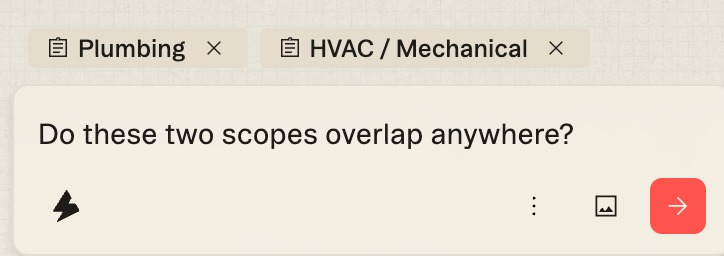
Chat is aware of your current view: which map you're in, the page, sheet or scope section in view, what you've selected, and what's open. A chip just above the prompt box shows what chat is referencing right now — the sheet number when you focus a sheet, or the scope and section when you open one, like Demolition · Inclusions. An × on the chip removes it if you want to ask about something else.
If you want an answer from one particular part of the set, say so in the question — see Prompting.
Attach exactly what you mean
Right-click a sheet or a scope and choose Ask chat. It's attached as a chip in the prompt box, so summarize this or is this covered anywhere else? has an unambiguous "this". Attach several; remove any with its ✕. Anything you attach is shown to you before you send.
Snip to Chat. Pick Snip to Chat from the toolbar — the scissors, second from the left — then drag a box over any region of a drawing to send that region straight into chat as an image. The quickest way to ask what is this symbol? or count these.
Your own images. Attach an image with the picture button in the chat box — a photo from site, a screenshot of a sub's takeoff, a marked-up detail.
What chat remembers
If you tell chat how you like things — always give quantities in imperial, call it Div 26, not Electrical — it may offer to save that as a preference for you or your organization. Saving shows a card first — Remember this for future chats? Adds this to Settings › AI preferences — with Remember and Deny; nothing is remembered without your say-so.
Good to know — Chat never works with hidden project context. What's in view, what you attached, and the preferences saved for you or your organization are the whole picture.
More docs