Signing up and signing in
Struction runs in the browser at struction.com. Your first project is free with a work email; after that you sign in with the same email, or with your Google or Microsoft account.
Updated 2 minApplies to: MapFeedback →
Sign up
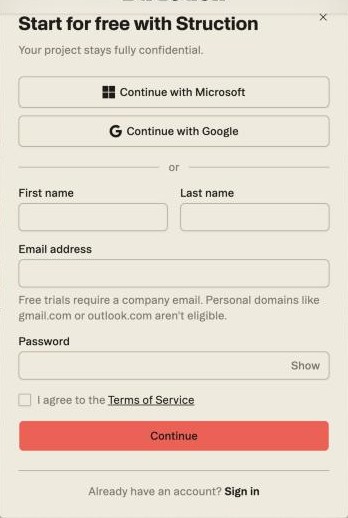
- Go to struction.com and click Try it free in the top bar. The Start for free with Struction box opens.
- Click Continue with Microsoft or Continue with Google, or enter your first name, last name, work email and a password. Tick I agree to the Terms of Service and click Continue.
- If you signed up with an email and password, Struction sends a six-digit code. Enter it on the Verify your email screen. You can't finish signing up until the address is verified — if you mistyped it, click Edit next to the address.
A free trial requires a company email address. The box says so under the email field — Free trials require a company email. Personal domains like gmail.com or outlook.com aren't eligible — and with a personal address the note turns red and Continue stays greyed out. If your company already uses Struction, signing up with a matching email domain offers you a place in the existing organization instead of creating a new one — see Onboarding and choosing a plan.
Sign in
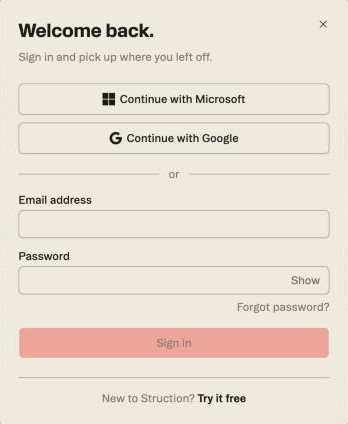
Click Sign in in the top bar on struction.com — once you're signed in, the same spot reads Open app. The Welcome back. box offers three ways in: Continue with Microsoft, Continue with Google, or your email address and password.
Forgot your password? Click Forgot password? under the password field. It opens the full Sign in to Struction page, which also offers Use passkey instead.
Good to know — Struction verifies your email once, when you sign up. Signing in after that never asks for a second step or a code. Single sign-on through your company's identity provider isn't available today; Google and Microsoft sign-in are the shared-login options.
Tip — If the verification email doesn't arrive within a few minutes, check spam and quarantine — company mail filters have held it before. Still nothing? Write to help@struction.com from the address you signed up with.
More docs