Why issues matter
Struction surfaces three kinds of issue — RFIs, risks and scope gaps — and scores the project on them. The scores and the progress tracker tell you where the job stands and what to buy down before bid day.
Updated 3 minApplies to: MapFeedback →
Three kinds, two places
RFIs are questions for the architect or owner. Risks are things that could cost you money, time or safety. Scope gaps are work no single trade clearly owns. All three live in the Risk Register, a ledger you open from the Risk register button (the warning triangle) on the right-hand rail, and appear as colored chips on the map, sitting on the exact sheets and scopes they affect. Resolved issues drop off the map; you'll still find them in the Risk Register.
Inside the register each issue carries a type. The full list is RFI, plain Risk, and seven named risk categories — Risk – Integrity, Risk – Complexity, Risk – Schedule, Risk – Cost, Risk – Safety, Risk – Coordination and Risk – Scope Gap. A scope gap is literally a kind of risk, which is why gaps appear in both places. You can change an issue's type at any time: double-click its Issue cell in the register and pick from the list.
The scores
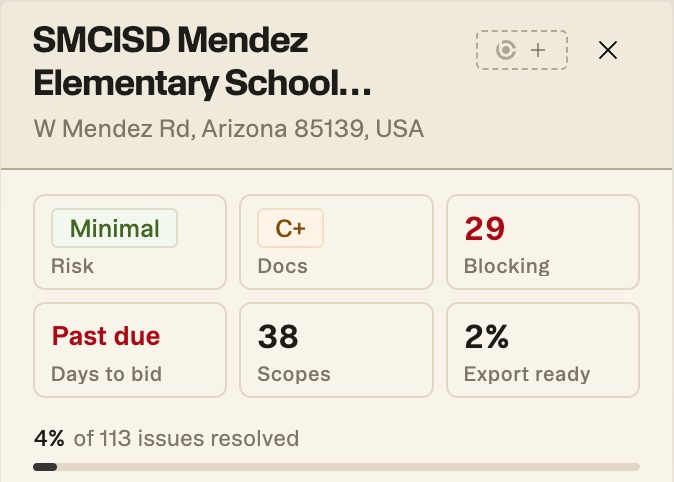
The scores sit as tiles at the top of the Project panel:
- Docs — how complete and aligned your documents are, as a letter grade such as C+. It's driven by the density of RFIs Struction found per drawing page: a set that raises few questions per sheet grades well.
- Risk — how much risk the project carries, driven by the density of risks per drawing page, shown as a word such as Minimal.
- Issues resolved — the bar under the tiles, such as 4% of 113 issues resolved. The other tiles count Blocking issues, Days to bid (it reads Past due once the bid date has gone by), Scopes, and the share that is Export ready.
Both scores are scaled to project size — a 400-sheet hospital isn't penalized for having more RFIs than a 40-sheet tenant improvement — and they flatten out at the extremes — the first few issues per sheet move the grade far more than the same number added to an already crowded set.
Buying down risk
The tiles track what you close. Answer an RFI and upload the response, or mark it resolved; resolve a risk, or accept it and carry it knowingly. A closed issue leaves the open counts straight away, but the grades are scaled to the whole set, so a single change on a large project may not move them. The point isn't a high score — it's walking into the bid knowing exactly what's resolved and what's still open.
Good to know — There are never fewer issues than trades on a project. At minimum, each trade has questions worth getting quotes on.
Workflow example — A week from bid, your Docs grade is sitting at a C−. You work the critical issues first — get three RFIs answered by the architect, upload the responses, and accept two low risks with contingency. The open counts come down, and you walk into the Go / No-Go meeting able to say exactly what's resolved and what's still open.
More docs