Anatomy of a scope
A scope of work is a trade-by-trade breakdown of everything a job entails, built from your drawings and specifications and editable down to the line and the quantity. This page names the parts so the rest of the section makes sense.
Updated 2 minApplies to: MapFeedback →
What a scope is for
A scope is meant to be used as a bid form. It spells out the responsibilities, assumptions and conditions a specialty contractor must account for, so the quotes you get back are comparable and complete. Struction writes one scope per trade it finds in the documents; you review, sharpen and send them.
The parts
| Part | What it is |
|---|---|
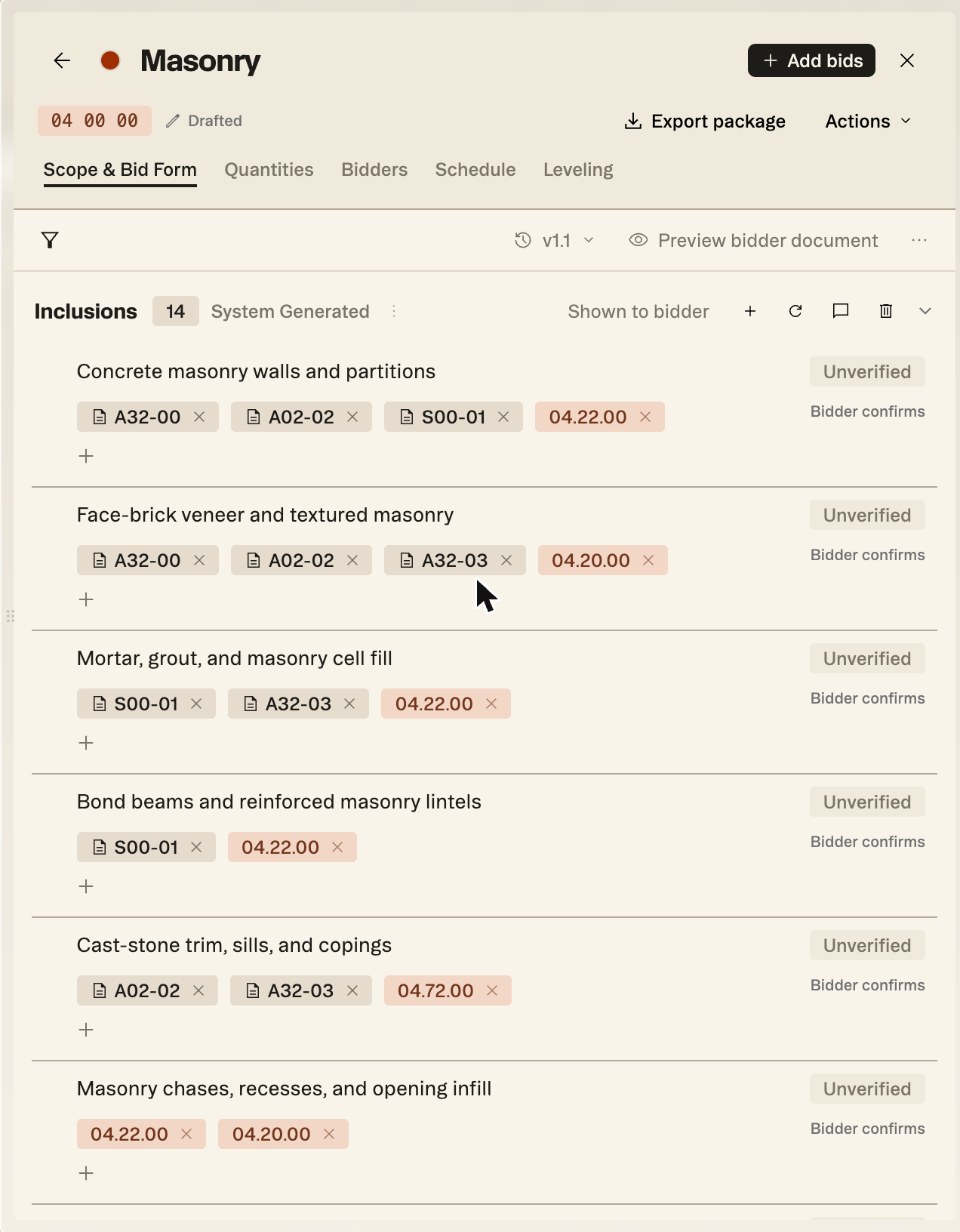
| Section | A category that organizes items for the specialty contractor: Inclusions, Exclusions, Coordination, Compliance. Each shows its item count, a System Generated tag until you edit it, and Shown to bidder. |
| Item | A single responsibility of the contractor (or, in Exclusions, a non-responsibility) needed for a complete scope. |
| Sources | Chips on the item for the drawing pages and spec sections that back it: sheet chips carry a page icon (A32-00), spec-section chips are tinted (04.22.00). The + under an item adds another. |
| Verified | Each item starts Unverified, because Struction's AI wrote it. Click the pill to mark it ✓ Verified once you've checked it against its sources. Verifying items before you send a scope to subs is strongly encouraged. |
| Bidder confirms | Shown on each item: the bidder is asked to confirm it in their response. |
| CSI code | Shown at the top of the scope (04 00 00). Scope names are CSI-based by default. |
| Stage | Where the scope is in your process, beside the CSI code: Drafted, In review, Ready to bid, Solicited, Receiving, Leveled or Carried. Click it to change it. |
| Version | The version button above the sections (v1.1) opens Version History. See Versioning. |
Tabs
A scope opens in the detail panel with five tabs: Scope & Bid Form, Quantities, Bidders, Schedule and Leveling. Scope & Bid Form holds the sections, then the bid form: Base bid, Alternates, Supplemental pricing and a link to the Project bid form shared by every bid package. Preview bidder document shows what a bidder will see.
In the Scopes of work panel
Each row shows the scope's name, its CSI code, its open-issue count, its stage, and how many of its items are verified. That ratio is the quickest read on where to spend review time.
Good to know — Work that doesn't belong clearly to one trade isn't forced into the wrong scope. It becomes a scope gap, on the Scope Gaps card beside the project card, for you to assign.
More docs