Adding and managing issues
Add an issue from the Risk Register or through chat; then filter and sort the register to work the ones that matter first, and export the list when it's time to send it.
Updated 2 minApplies to: MapFeedback →
Two ways to add an issue
- In the Risk Register. Open it from the right-hand rail (G then R); its heading reads Risks, RFIs, and Scope Gaps. Click + (New issue) in the panel header. The dialog lets you link the issue to a sheet and to a scope item yourself.
- Through chat. Raise an RFI: the mezzanine sprinkler heads aren't specified on FP2.1. Chat fills the fields and shows an approval card.
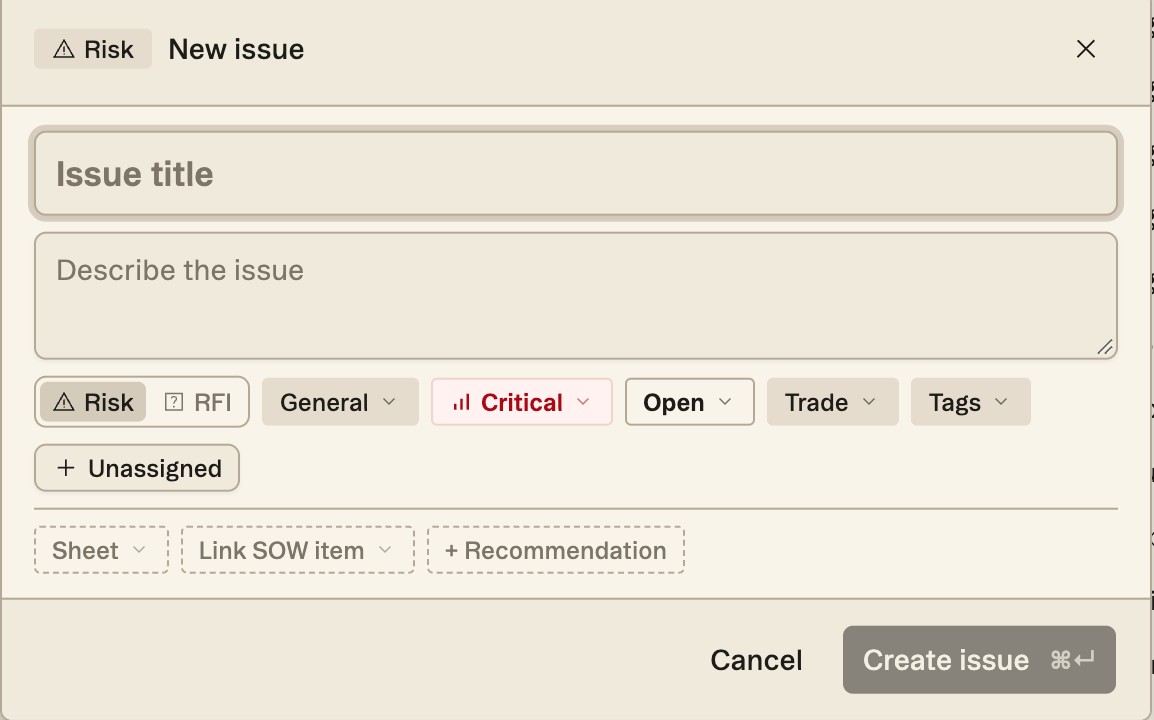
The New issue dialog starts with an Issue title and a description. Choose Risk or RFI, then set the category (General to start), the severity (Critical to start), the status (Open), the Trade and any Tags, and assign it to someone. Below them are optional links: Sheet, the sheet the issue comes from, and Link SOW item, which ties the issue to a scope item, plus + Recommendation. Nothing is marked required, but fill in what you have — the export is only as useful as what's in it.
Filter and sort
In the Risk Register, filter by Severity, Status, Type, Trade or Sheet, and sort by Severity, Newest or Name, ascending or descending — so you can work every critical issue across every trade, or every open RFI for Mechanical. Group by breaks the list into Trade or Type. You can also ask chat — show me the open critical issues on structural — and it answers with a list of issue chips; click one and the Risk Register opens with that issue expanded. Tags label an issue so you can see what it belongs to across trades and sheets. Manage tags in the panel header creates them, and the Tags field on an issue applies them. Tags are not in Add filter… or Group by, so a tag is something you read on an issue rather than a way to pull up a list.
Export
Export the register to Excel or CSV with Export issues in the Risk Register header — it exports only what your current filter shows — to send RFIs to the architect or share the risk list with your team.
Tip — Work the register by severity, not by trade. Critical issues across all trades first; then the Medium issues on the trades you're most exposed on.
More docs