Exporting
Export is the first hard deliverable Struction produces — the workbook you send to subcontractors or attach to your invitations to bid. Export one trade or every scope, and choose which trades, format and issues go out.
Updated 2 minApplies to: MapFeedback →
Two ways to export
- Export package — in a scope's header, exports that one scope.
- Export all Scopes — in the ⋮ menu of the Scopes of work panel, exports every scope into one workbook with one trade per tab and a Summary tab up front. The request runs through chat: an Export request appears in the conversation, and chat replies with the download — for example SOW … Combined 2026-11-04.xlsx — and the list of scopes it exported.
Because the export runs through chat, you can also ask chat for it in your own words.
Choose what goes out
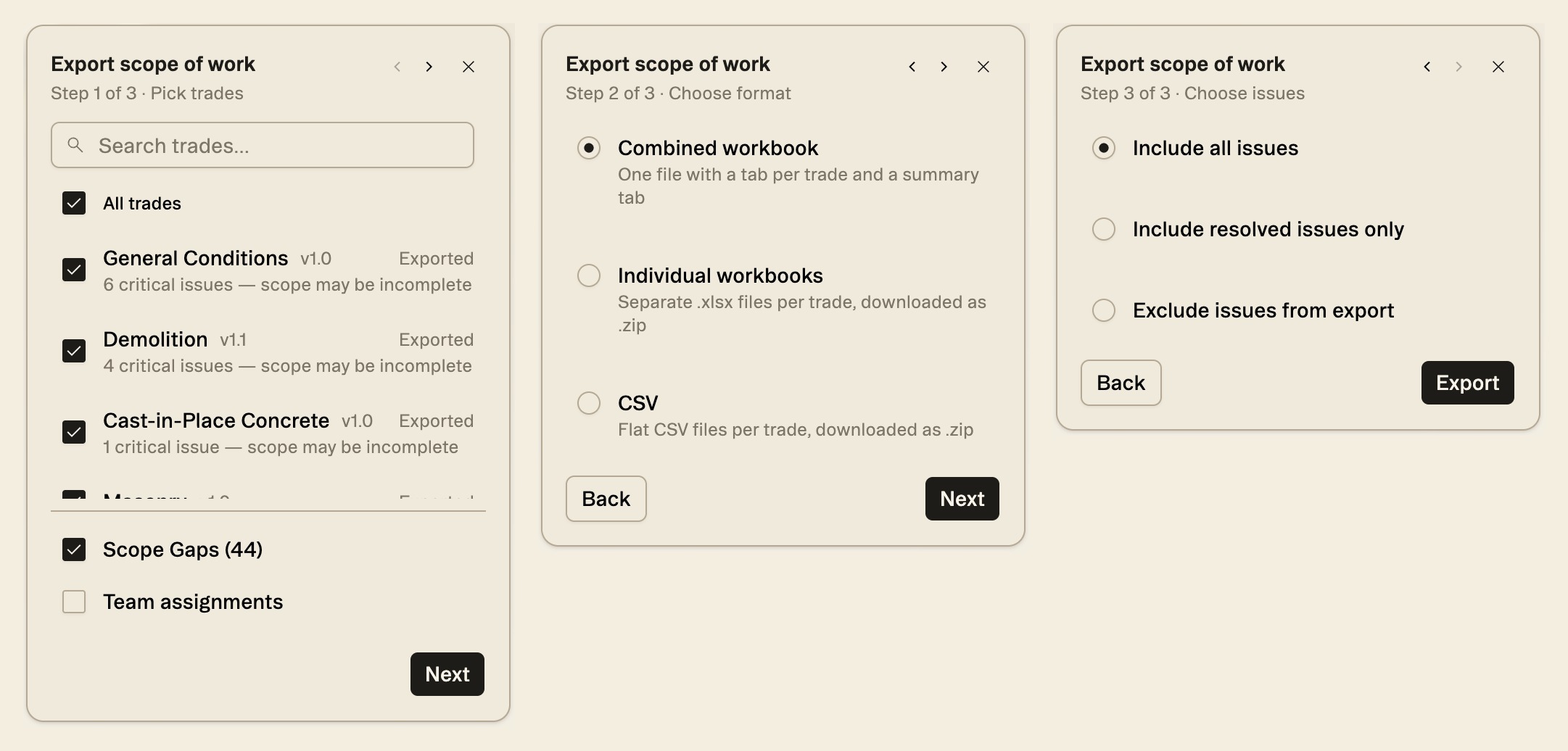
Export all Scopes walks you through three steps. Pick trades: every trade or just some, plus Scope Gaps and Team assignments if you want them; a trade with open critical issues is flagged "scope may be incomplete". Choose format: a Combined workbook (one file with a tab per trade and a summary tab), Individual workbooks (a separate .xlsx per trade, downloaded as a .zip) or CSV (flat files per trade, downloaded as a .zip). Choose issues: include all issues, only resolved issues, or none. Export package on a single scope skips the steps and downloads that scope straight away, as a workbook with three tabs: Invitation to Bid, Scope of Work and Bid Form.
Each tab ends with Generated by Struction and the export date, and the scope tab's title carries the version, such as Scope of Work - v1.0. On the Scope of Work tab, each item has Response, Your answer and Exception / explanation columns for the bidder; nothing in the workbook is locked.
Workflow example — Your scopes are reviewed and verified. You choose Export all Scopes, keep every trade, pick Exclude issues from export, and get a clean Excel workbook with one tab per trade and a summary. You attach it to your ITB and send it to your bid list.
Good to know — Bidding through BuildingConnected? You don't have to export and re-key. Struction can write your scopes straight onto the bid packages' scope forms — see Publishing scopes to BuildingConnected.
More docs