Versioning
Every scope carries its full history — every AI change and every edit you make is tracked, attributed and reversible. Documents are versioned by issuance; scopes are versioned like this.
Updated 2 minApplies to: MapFeedback →
Version numbers
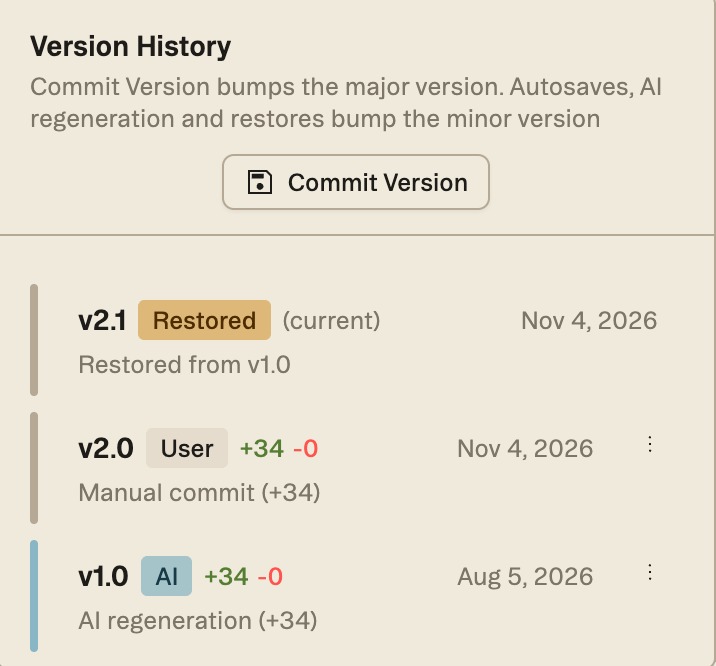
Versions use a MAJOR.MINOR format, and Version History states the rule at the top of the panel:
Good to know — Commit Version bumps the major version. Autosaves, AI regeneration and restores bump the minor version.
In practice, AI regenerations and restores add a minor version — restoring v1.0 on top of v2.0 made v2.1 — while your own edits save as you go and are picked up by the next commit. Commit Version starts a new major version, at the end of a review pass, say, or before you export; it stays greyed out until there is something new to commit. Each entry shows the version, a label for where it came from (AI, User or Restored), how many items were added and removed (+34 −0), a short summary such as Manual commit or Restored from v1.0, and the date.
Version History
Open Version History from the version button above the scope's sections — a clock icon and the current number, such as v1.0. The current version is marked (current), so you don't mistake an older one for it.
Restore
To go back, open an older version's ⋮ menu and choose Restore. Struction asks first — This will create a new version with the content from v1.0 — and the restored copy becomes the current version, labeled Restored. Nothing in the history is lost. The same menu also has Delete.
Good to know — If you regenerate a scope after an addendum reissues a sheet, the +N / −N counts can overstate the change: items on the reissued sheet may show as removed and added even when their text is identical. Read the summary, not just the numbers.
More docs