Decide who sees each bid
Nov 2026
Sharing
Set the audience for every project
A negotiated hospital job and a public school bid rarely need the same audience. One can be open to every estimator in the company. The other should open only for the handful of people working it.
Settings › Sharing & permissions is where you set that up once for the whole organization: the role your team starts with on a project, and which outside companies your projects can be shared with.
The roles
Know what each role allows
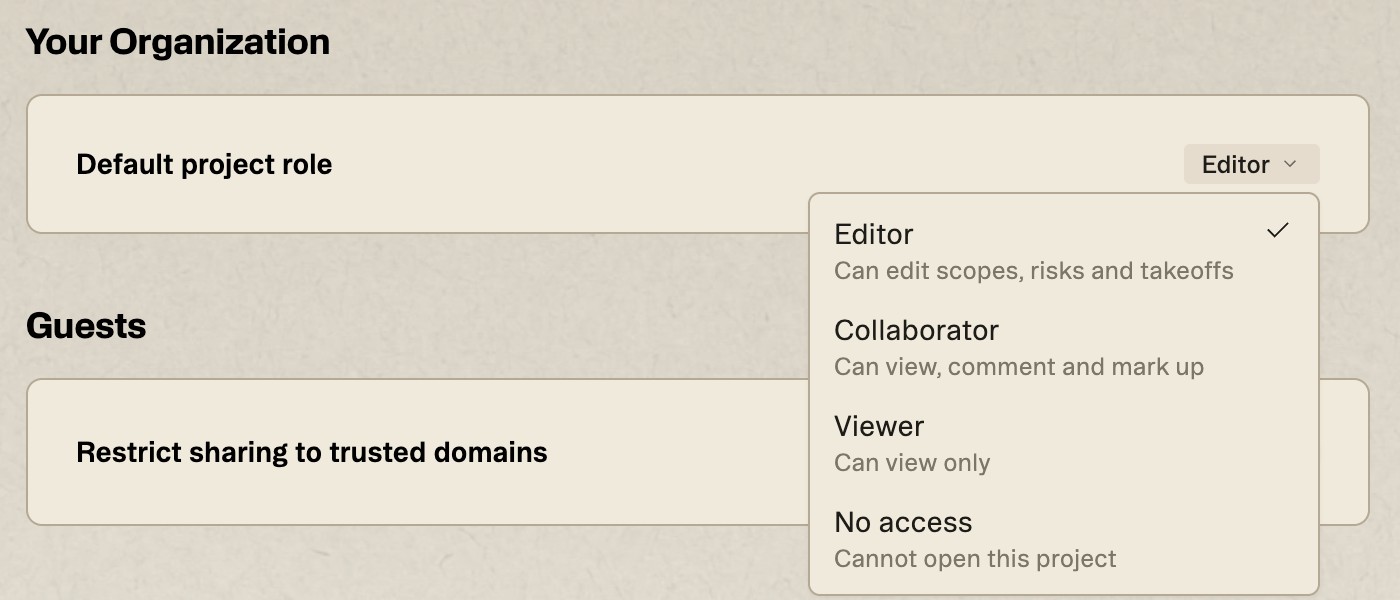
Default project role has four options, and the menu spells out what each one allows:
- Editor can edit scopes, risks and takeoffs.
- Collaborator can view, comment and mark up. Editing scopes, risks and takeoffs stays with Editors.
- Viewer can view only.
- No access can’t open the project until someone adds them to it with a role.
The default covers everyone in your company. Inside a project, the Share dialog still lets you add one person by name and give them their own role. That’s also where you’ll find Owner, which can do everything, including deciding who has access. Owner isn’t offered as a default.
Setup
Set it once for the whole organization
- Open Settings from the account menu in the top right.
- Choose Sharing & permissions.
- Under Your Organization, open Default project role and pick a role.
- Under Guests, turn on Restrict sharing to trusted domains and add each domain you share with.
Guests
Keep guest sharing to domains you trust
Restrict sharing to trusted domains controls which outside companies a project can be shared with. Switch it on and you can add each domain you share with.
Until you add one, the list reads No trusted domains yet. Start with the firms you share with on every job, like your architect and your owner’s rep.
Which default
Pick the default that matches your projects
- Everyone at your company works every bid: Editor.
- Other offices should see a bid and comment on it without changing it: Collaborator.
- Other offices only need to look: Viewer.
- Some pursuits can’t be seen by anyone off the bid team, like a hospital system or public agency job under a confidentiality agreement: No access. Then add the bid team by name in each project’s Share dialog.
You asked
Why we built it
A general contractor asked for a company-wide default during onboarding, so a confidential pursuit starts closed without anyone having to remember to lock it.
Put it against a real set.
Upload one project free with a work email. Struction reads the drawings, drafts the scopes trade by trade, and keeps every line pointed back at the sheet it came from.
Upload a set →