Artifacts: your company’s paperwork, drafted from the drawings and specs
Oct 13th, 2026
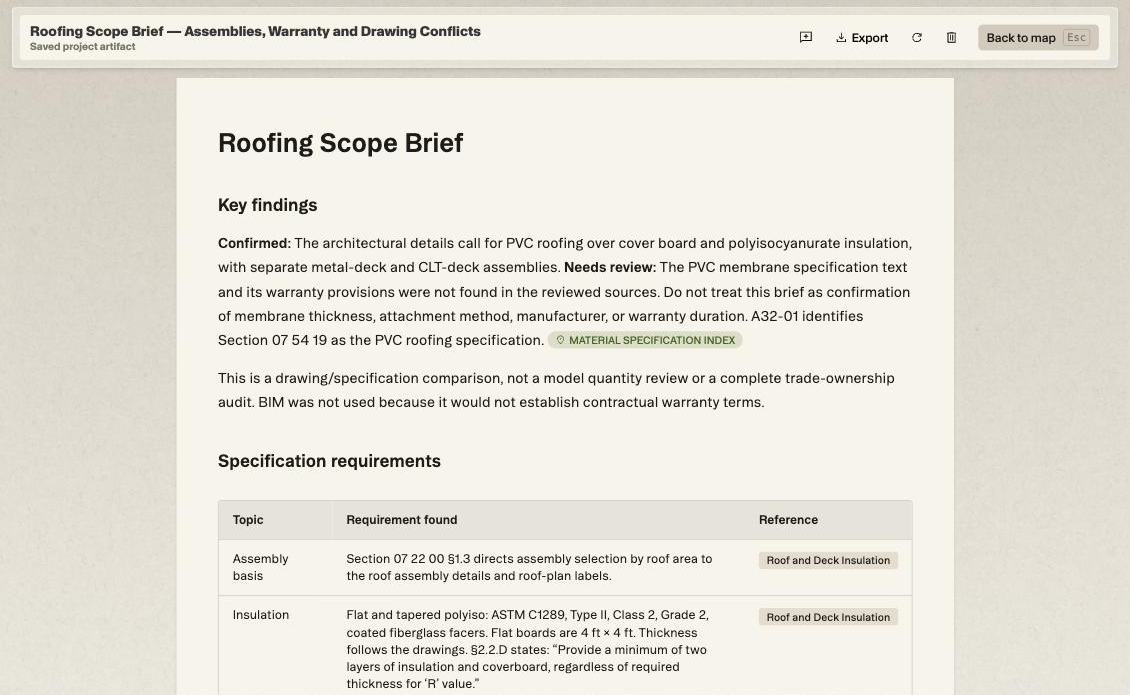
Every team keeps its own paperwork: a responsibility matrix, a scope summary, a brief for the sub. Artifacts let you ask project chat for the one you need, laid out the way you describe it, with every line tied to the sheet or spec section behind it. Here’s a roofing brief on an elementary school set.
The request was plain: the roof assembly and warranty the spec calls for, what the roof plan details show, and anywhere the two disagree.
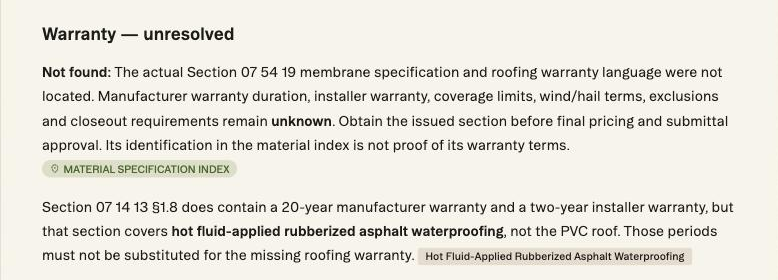
It came back with the assembly requirements in a table, each tied to its spec section. Then it flagged what a skim would miss: the PVC roofing section, 07 54 19, wasn’t in the set, so the roof warranty is unknown.
There was a 20-year manufacturer warranty in the set. It sits in 07 14 13, which covers hot fluid-applied waterproofing, and the brief named it and refused to carry it over to the roof.
HOW TO MAKE ONE
Type /artifact and say what you need
1. Open the project and click into chat at the bottom left of the map.
2. Type /artifact, then describe the document. Name the trade, the question and what each line should point back to. For example: Roofing scope brief: the roof assembly and warranty the spec calls for, what the roof plan details show, and any conflicts between them, each with its sheet or spec section reference.
3. Let it run. The chat lists every search and every document it opens while it works. A brief like this one takes a few minutes.
4. Read the draft. Nothing is saved until you click Approve, and Deny discards it.
5. Once approved it becomes a saved project artifact, linked to the scope it covers. A roofing brief files under roofing.
READING IT
Click a chip to check the line
Every finding carries a chip naming its source. Some point to a spec section, like Roof and Deck Insulation. Others point to a region of a drawing, like R01 - Roof Assembly - Metal Deck.
Click one and Struction opens that sheet in focus with the region outlined. A Return to artifact button sits at the top, so checking a line costs two clicks and you never lose your place in the brief.
The brief sorts its own confidence, too. Confirmed findings say Confirmed. Anything it could only half establish says Needs review, followed by what would settle it.
WHAT IT CAUGHT
Four questions for the design team
Past the missing roof section, the brief flagged four items to settle before buyout, the kind that turn up as change orders when nobody reads the details side by side.
The insulation notes on A32-01 cite 07 21 00, while the roof insulation section in the set is 07 22 00. The brief calls it a reference discrepancy and says plainly that it isn’t proof the materials conflict.
Detail 4/A32-01 shows 2 inches of polyiso at R-13 over the CLT deck. Section 07 22 00 asks for at least two layers of insulation and cover board regardless of R-value, and the detail doesn’t show how the layers split.
Plumbing detail 3/PL17-03 suggests a modified-bitumen stripping ply at the roof hose bibb, on a PVC roof. The detail itself defers to the manufacturer, so the brief asks for a PVC-approved flashing detail instead of declaring a conflict.
Roof plan A10-03 sends you to A32-00 for typical assemblies, but the R01 and R02 details are on A32-01. The brief asks for the reference to be checked and stops short of saying A32-00 is wrong.
MORE THAN BRIEFS
A responsibility matrix and a submittal log
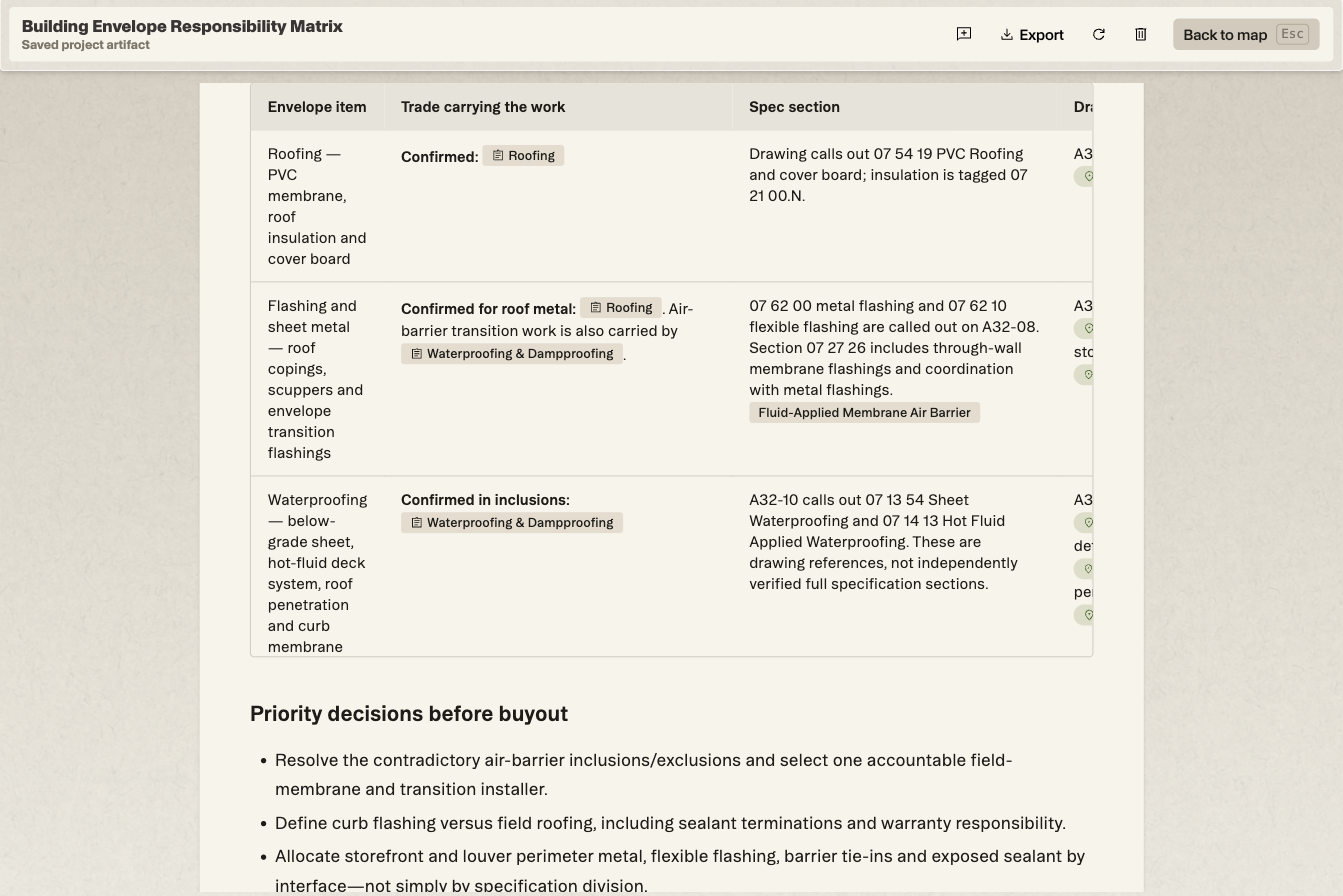
A brief is one shape an artifact can take. Ask for a building envelope responsibility matrix and you get each envelope item as a row, the trade carrying it, the spec section and drawing behind it, and a column for anything split or unclear.
On this school, the matrix found two scopes that both claim the air barrier, and HVAC roof curbs that no scope carries, with a recommendation to send an RFI. It closed with a short list of decisions to settle before buyout.
A submittal log works the same way. Ask for one for Division 08 openings and it lists every required submittal, from product data and shop drawings to samples and warranties, with the spec section and the trade responsible for each.
TAKING IT WITH YOU
Export it to PDF, Word or Excel
The artifact header has an Export menu with PDF, DOCX and XLSX. That covers the brief going out with a bid package, into an RFI, or across the desk to the roofing sub.
The artifact also stays with the project, linked to its scope, instead of scrolling away in a chat thread.
THE CATCH
It reads what you upload
A brief can only cite what’s in the set. When a section is missing, Struction says so instead of filling the gap. That’s the behavior you want, and it’s also a nudge to make sure the set is whole before you lean on any summary of it.
Don’t trust it. Check it. Two clicks a line.
Put it against a real set.
Upload one project free with a work email. Struction reads the drawings, drafts the scopes trade by trade, and keeps every line pointed back at the sheet it came from.
Upload a set →